TL;DR: When a dealership changes its name due to new ownership or a rebrand, SEO often breaks. The old name carried search authority, and Google may not connect it with the new business name. To recover, update your website content, fix technical SEO, redirect old links, and strengthen local SEO. AutoSweet helps dealers handle this process quickly so their new brand shows up in search and brings in buyers
Why Does SEO Break After a Dealership Name Change?
A dealership rebrand usually causes a dip in search traffic because search engines still recognize the old name, not the new one.
Here’s what happens when you change names:
- Lost search equity: Your old name built recognition with Google over time. A sudden switch makes it look like a “new” business.
- Inconsistent listings: Google Business Profile, maps, and directories still show the old name.
- Confused content: Manufacturer-approved websites often use the same pre-written text across many dealerships. When you change your name, those duplicate details make it harder for Google to figure out your new identity.
If you’re asking, “Why did my dealership disappear from Google after rebranding?”, this is why.
How Do I Fix SEO for My Dealership After a Rebrand?
Here’s a step-by-step process for fixing SEO post-rebrand that works for most dealerships.
Step 1: Audit Your Online Presence
The problem: Your old dealership name is still scattered across the internet.
Why it matters: Search engines value consistency. If your NAPU (Name, Address, Phone number, and URL) isn’t identical everywhere it appears online, search engines see conflicting data, which can hurt your rankings and confuse potential customers.
The fix: Make a list of every place your dealership appears online, including your website, Google Business Profile, map listings, and local directories. Check each one for outdated information, and flag any that still reference your old name, phone number, or web address.
Step 2: Update Website Content
The problem: Your website still uses the old name.
Why it matters: Google reads page titles, descriptions, and on-page text to figure out who you are. If those still show the old brand or name, your site will rank lower in searches.
The fix: Scour your website thoroughly. Update all page titles, descriptions, and copy with the new name. Create fresh content like blogs or landing pages that highlight your new dealership name alongside local keywords.
Step 3: Redirect Old Pages
The problem: Old web pages tied to your previous name may no longer work.
Why it matters: If a customer clicks one of those old links and sees an error, you lose both traffic and Google’s trust.
The fix: Set up “redirects” that send visitors (and Google) from the old page to the new one automatically. This way, you keep the search value you’ve built over time.
Step 4: Optimize Technical SEO
The problem: Many dealership websites are controlled by manufacturer-approved providers like Dealer.com, CDK, or Dealer Inspire. These sites often include pre-written text and default settings that are the same across multiple dealerships.
Why it matters: If your titles, descriptions, and vehicle details look like everyone else’s, your site struggles to stand out. After a name change, those defaults may even show your old dealership name.
The fix: Rewrite key technical details like titles, headers, and descriptions with your new name. Update your copy so it’s unique to your dealership instead of generic text. Also, check that your site loads quickly and works well on mobile. Google rewards both in search.
Step 5: Strengthen Local Search
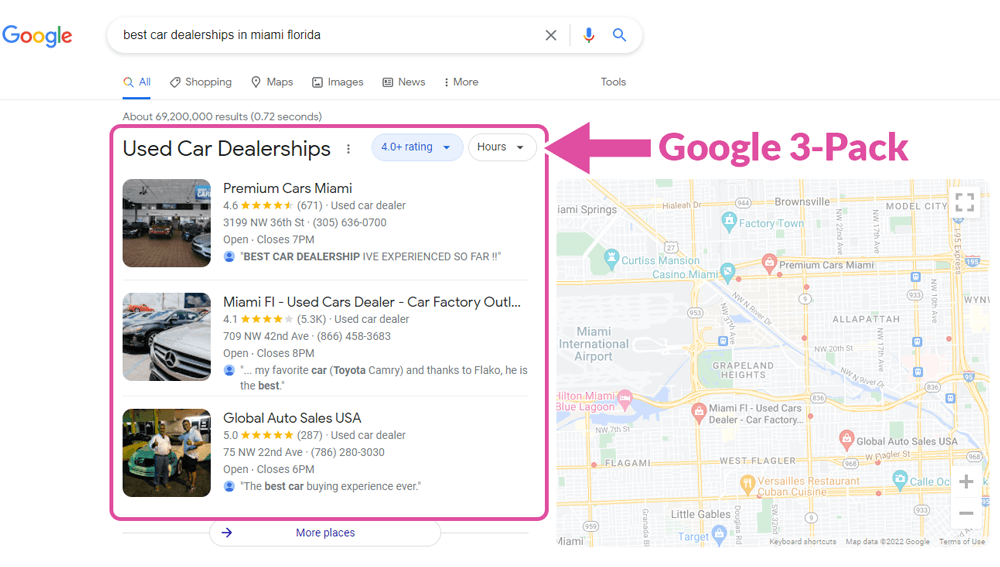
The problem: Buyers searching “car dealerships near me” may not see your new brand name.
Why it matters: Most dealership traffic comes from local shoppers, so visibility in your immediate area is critical.
The fix: Update your Google Business Profile and directories. Ask happy customers to leave new reviews under the updated name. Create local content that mentions your city, county, or neighborhood so your dealership shows up in those searches.
Step 6: Monitor and Adjust
The problem: SEO changes don’t show results overnight.
Why it matters: If you don’t track progress, you won’t know what’s working.
The fix: Monitor your website traffic, search rankings, and phone calls from local searches. Use these insights to fine-tune your updates.
Why Acting Fast Matters for Dealership SEO
Every week of poor search visibility equals lost leads, calls, and visits. Competitors are quick to capture the buyers you’re missing. The sooner you update your SEO, the faster your new name will build recognition with Google and shoppers
How AutoSweet Helps Dealerships Fix SEO After a Name Change
If you’re asking, “What’s the best way to fix dealership SEO after a rebrand?” AutoSweet has a proven process:
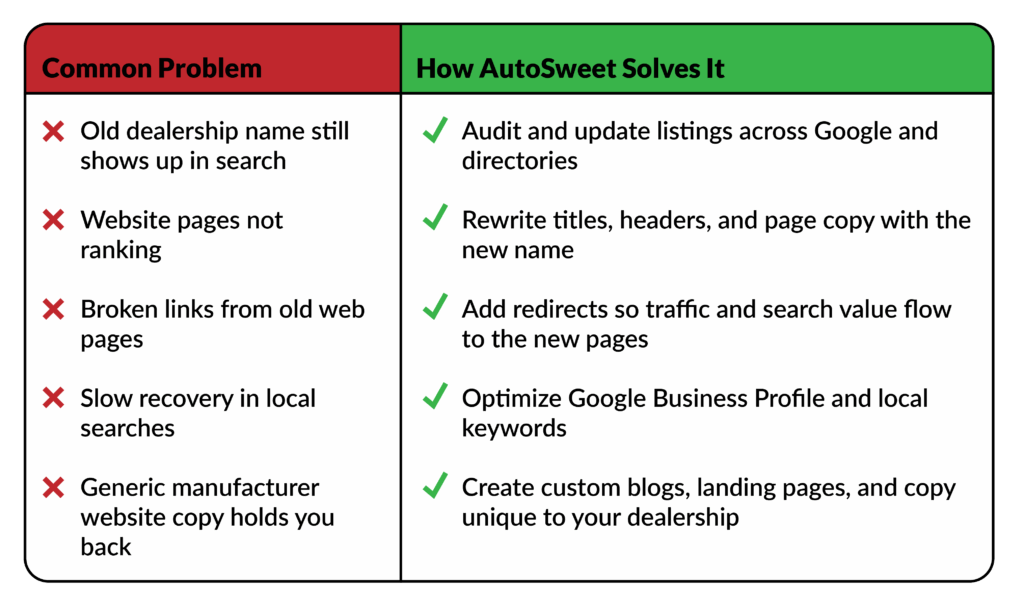
With AutoSweet, your rebrand does not mean starting from zero online. Our team updates your site, fixes the technical details, and strengthens your local presence so your new dealership name quickly shows up where buyers are searching.
FAQ: Dealership SEO After a Rebrand
Q: How long does it take to recover SEO after a dealership name change?
A: With the right steps, dealers can often see improvements in weeks. Without fixes, it may take months.
Q: Can I fix SEO myself or do I need an agency?
A: Dealers can update basic content and listings, but technical SEO and redirects often require expert help.
Q: What if my manufacturer controls my website?
A: AutoSweet specializes in working with manufacturer-mandated sites. We optimize within those restrictions to give your dealership a competitive edge.
Final Takeaway
If you are rebranding your dealership and worried about customers not being able to find you because of lost SEO, act fast. Update your content, fix your technical SEO, strengthen local search, and redirect old links.
AutoSweet helps dealerships handle this process from start to finish so you can focus on selling cars, not fighting search rankings.
If you’re not sure how your dealership’s online presence looks after a rebrand, start with a free audit of your brand online. AutoSweet’s SEO team will review your NAPU consistency, website performance, and search visibility, so you know exactly what’s working and where to improve.
Get your free audit here and protect your SEO during a rebrand.